Social media image sizes are constantly changing.
One moment you have the perfect cover page for your account, and the next it’s been resized and looks pixelated and wrong.
It can be difficult to find official dimensions and image sizes information.
But don’t worry, you can consult this guide to social media image sizes on all important social media platforms!
Below are the most recent social media image dimensions, as of October 2024.
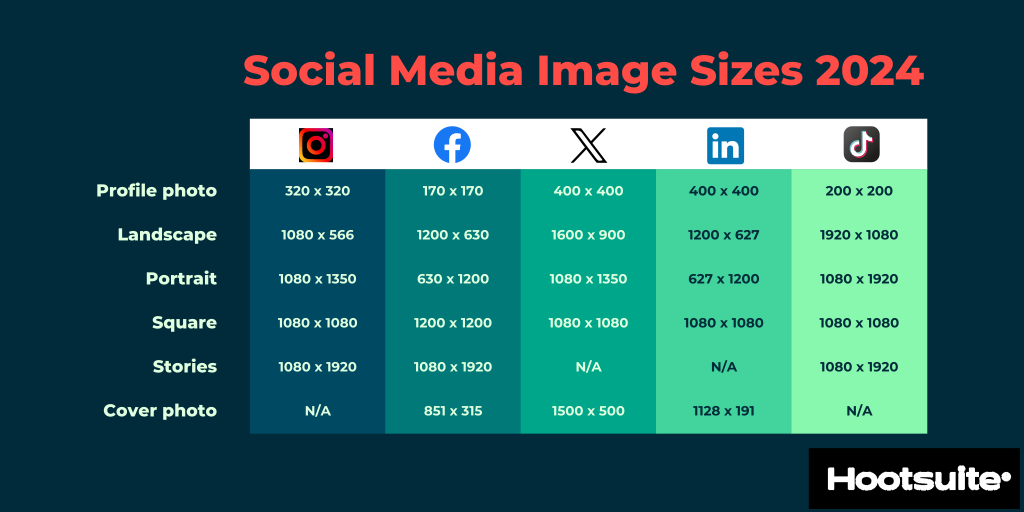
We provide more detail for each network below, but this image includes the social media image sizes you probably look up most often.
Basic Instagram image sizes
- Profile photo: 320 x 320 px
- Landscape: 1080 x 566 px
- Portrait: 1080 x 1350 px
- Square: 1080 x 1080
- Stories and Reels: 1080 x 1920
Basic Facebook image sizes
- Profile photo: 170 x 170 px
- Landscape: 1200 x 630 px
- Portrait: 630 x 1200 px
- Square: 1200 x 1200 px
- Stories and Reels: 1080 x 1920 px
- Cover photo: 851 x 315 px
Basic X (formerly Twitter) image sizes
- Profile photo: 400 x 400 px
- Landscape: 1600 x 900 px
- Portrait: 1080 x 1350 px
- Square: 1080 x 1080 px
- Cover photo: 1500 x 500 px
Basic LinkedIn image sizes
- Profile photo: 400 x 400 px
- Landscape: 1200 x 627 px
- Portrait: 627 x 1200 px
- Square: 1080 x 1080 px
- Cover photo: 1128 x 191 px
Basic TikTok image sizes
- Profile photo: 200 x 200 px
- Landscape: 1920 x 1080 px
- Portrait: 1080 x 1920 px
- Square: 1080 x 1080 px
- Stories: 1080 x 1920 px
Instagram image sizes
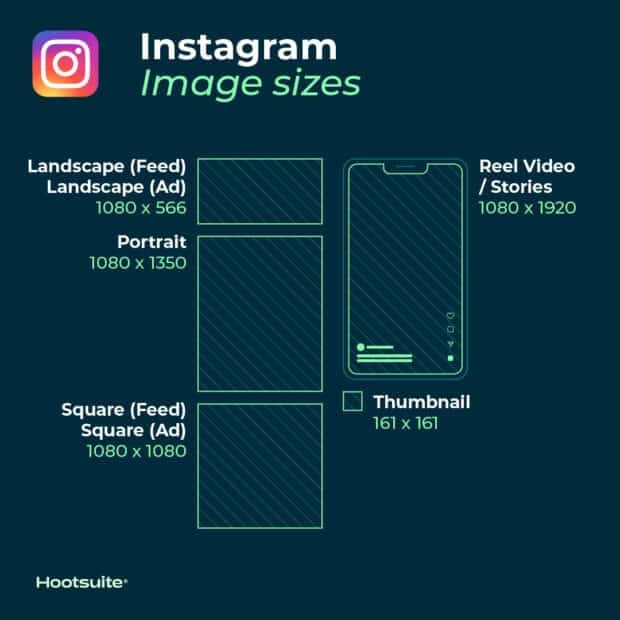
Instagram supports horizontally and vertically oriented images as well as square images. This gives your brand more options but also makes image dimensions trickier to get right. Follow these guidelines for the best results.

Instagram profile picture size: 320 x 320 pixels
Instagram profile photos are displayed at 110 x 100 pixels, but the image files are stored at 320 x 320 pixels, so upload an image of at least this size.
Even though the dimensions are square, Instagram displays profile photos as circles. Make sure your important elements are in the center to avoid cropping.
Instagram post sizes (feed photos):
- Landscape: 1080 x 566 pixels
- Portrait: 1080 x 1350 pixels
- Square: 1080 x 1080 pixels
- Supported aspect ratios: Anywhere between 1.91:1 and 4:5
- Recommended image size: Width of 1080 pixels, height between 566 and 1350 pixels (depending on landscape or portrait)
Tips:
- For the best Instagram images, upload an image that is 1080 pixels wide.
- If you upload an image larger than 1080 pixels, Instagram will downsize it to 1080 pixels.
- If you upload an image with a resolution lower than 320 pixels, Instagram will increase it to 320 pixels.
- Images between 320 and 1080 pixels wide will be kept at their original resolution as long as the aspect ratio is between 1.91:1 and 4:5.
- If the aspect ratio is different, Instagram will automatically crop the photo to fit a supported ratio.
Resource: Learn how to edit Instagram photos like a pro.
Instagram photo thumbnail sizes:
- Display size: 161 x 161 pixels
- Recommended upload size: 1080 pixels wide
Tips:
- Instagram keeps versions of thumbnails as large as 1080 x 1080 pixels.
- For future-proofing and to avoid pixelation, upload the largest images possible.
Instagram Stories image size: 1080 x 1920 pixels
Tips:
- This is a 9:16 aspect ratio.
- For quicker buffering, upload an image with smaller dimensions but the same aspect ratio.
- Using a different aspect ratio may result in strange cropping, zooming, or blank sections of the screen.
- Instagram Reels use the same sizing.
Resource: Take your Instagram Stories to the next level with these free templates.
Instagram carousel image sizes:
- Landscape: 1080 x 566 pixels
- Portrait: 1080 x 1350 pixels
- Square: 1080 x 1080 pixels
- Aspect ratio: landscape (1.91:1), square (1:1), vertical (4:5)
- Recommended image size: Width of 1080 pixels, height between 566 and 1350 pixels (depending on landscape or portrait)
Instagram Reels sizes:
- 1080 x 1920 pixels
- This is a 9:16 aspect ratio.
- Cover photo: 1080 x 1920 pixels
- Keep in mind that Reels are cropped to a 1:1 image in your profile feed and a 4:5 image in the home feed.
Instagram ads image sizes:
- Landscape: 1080 x 566 pixels
- Square: 1080 x 1080 pixels
- Minimum width: 320 pixels
- Maximum width: 1080 pixels
- Supported aspect ratios: Anywhere between 1.91:1 and 4:5
Tips:
Image sizes for Instagram Stories ads: 1080 x 1920 pixels
Tips:
X (f.k.a. Twitter) image sizes
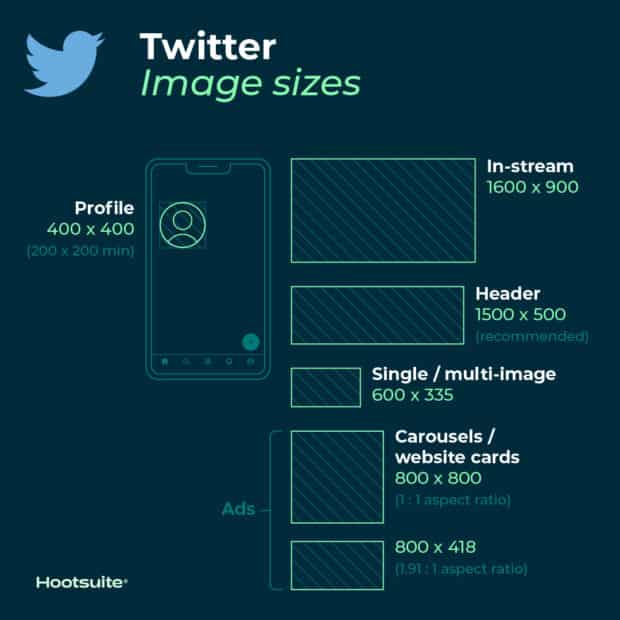
Tweets with images get more engagement than text-only tweets. It’s important to get the right image sizes for X (formerly Twitter) to make your content more engaging.
X (Twitter) image sizes for profile photos: 400 x 400 (recommended)
- Minimum image size: 200 by 200 pixels
- Maximum file size: 2MB
X (Twitter) header photo size: 1500 x 500 pixels (recommended)
Tips:
- To future-proof the image, it’s best to use the maximum size.
- Header images are cropped to an aspect ratio of 3:1.
- Remember that the way header images display changes depending on the monitor and browser being used.
X (Twitter) images sizes for in-stream photos: 1600 x 900 pixels (recommended)
- Minimum size: 600 by 335 pixels
- Recommended aspect ratio: any aspect between 2:1 and 1:1 on desktop; 2:1, 3:4 and 16:9 on mobile
- Supported formats: GIF, JPG and PNG
- Maximum file size: Up to 5MB for photos and GIFs on mobile. Up to 15MB on the web.
X (Twitter) card image size:
X (Twitter) automatically pulls in content, including images, when a post includes a URL. Ensure your images meet these specifications:
- Minimum size:
Suscríbete a nuestra Newsletter y te regalamos 100 seguidores para tu Instagram