
How to Run an Instagram Giveaway Successfully
Running an Instagram giveaway or contest is a strategic way to engage your audience and grow your following. Plus, it’s a fun way to give back to your followers—and work to turn more of your followers into customers.
There are so many social media contest ideas out there that could be a perfect fit for your brand, and they can even be a stellar tactic for building a library of user-generated content and new followers.
Throughout this article, we’re going to dive deeper into what an Instagram giveaway is and why you’d want to host one—plus a step-by-step showcasing how to put on your own giveaway successfully.
Why should you host an Instagram giveaway?
An Instagram giveaway or contest tends to start with an Instagram post that asks your audience to complete some sort of task to enter into a giveaway to win a free product or prize. This type of campaign can generate a lot of excitement around your brand, bringing in new eyes and increasing reach and engagement… sometimes by a lot.
There are a number of benefits to employing this strategy—let’s cover the most important ones.
Get more followers
Many brands require that users entering their giveaway must first follow them on Instagram. Follow-gating your giveaway like this ensures that your Instagram following grows alongside your entries. While you’ll likely start receiving entries from those who already follow you, prepare to see some growth as your giveaway gains traction.
Generate higher engagement
Instagram giveaways can generate higher engagement on specific posts (your giveaway announcement, obviously)—but it can also improve your engagement overall. Algorithms work in funny ways, but once it realizes that you’re getting a lot more engagement than usual, it’ll start to place your content in front of even more eyes, boosting your total engagement.
Increase reach and impressions
Similarly, your Instagram giveaway can help you increase your overall reach and impressions. The more engagement on your giveaway posts, the more likely your content will be shown to followers. If users keep seeing your content and interacting with it, you’ll pop up at the top of their feeds more often, helping to increase your reach.
Create an opportunity to collaborate with others
Lastly, Instagram giveaways present a great collaboration opportunity. Many brands (as you’ll see us cover shortly) choose to co-host giveaways. Find a brand with a product that’s complementary to yours (i.e., if you sell silk pillowcases, collab with a brand that sells hair masks) and give away those products together in a beautiful little bundle.
Types of Instagram giveaways
There are five main types of Instagram giveaways that you’ll see brands utilize. We’ll walk you through how each of these works and why you might want to choose that route.
1. Like, comment and follow
One of the most popular methods of entry is to have people like your photo announcing your Instagram contest, leave a comment and follow your account in order to gain entry.
Or, you could make commenting the most important part of the entry, like we see in this fun holiday-themed giveaway from Edible Arrangements: When you use this tactic, simply name your prize, lay down the ground rules and watch the entries fly in. You can ask people to comment on why they should win, nominate someone to win or simply tag a friend to spread the word.
That last option is a great contest idea all on its own — read on for more ways to make tagging friends in contests work effectively.
2. Tag a friend
Want to really get the word out about your Instagram contest? Ask people to tag a friend when they enter! Users can tag as many friends as they like in order to get even more entries.
Then, those users are likely to enter and tag some of their own friends, creating a ripple effect of awareness around your contest and brand. You can also host a tag-a-friend Instagram contest in order to ask your followers to nominate someone who deserves a prize.
Here’s an example of what this might look like from Edible Arrangements: Edible Arrangements asked users to enter the contest by tagging a friend in the comments. Many giveaways allow users to tag multiple friends as a way of entering more than once, increasing their chances.
3. User-generated content
If you’re looking to put together a campaign around gathering user-generated content (UGC) to share online, creating an Instagram giveaway around that concept can be a great way to do it.
Ask your audience to share a photo onto their feed using a specific branded hashtag or tagging your business so that you can easily find all of the entries in one place.
Not only does this reward your customers for helping you out, but it gives you an entire arsenal of user-generated photos to share on your feed for future content planning.
Because this type of giveaway entry requires a lot more effort on your audiences’ part, you’ll want to make the prize worth it.
4. Collaboration
As we mentioned earlier, another way to broaden your audience is by collaborating with a similar brand for your giveaway prizes. This way, the audiences of all involved brands can learn about new, similar brands, and have an even better prize at the end.
Here’s an example of this type of collaborative giveaway where three brands got together to offer a major prize bundle as their giveaway prize: Many influencers also host collaborative giveaways like this, meant to help their followers discover new brands and bloggers, and vice versa.
If you’re working to grow your Instagram presence, a collaborative contest or giveaway might be your best bet.
5. Instagram Stories
While Instagram contests are all about giving back to your audience, there are important benefits for your overall Instagram marketing strategy too: brands can garner a lot of attention and generate a bigger audience through them as well.
Having your audience share a post on their Instagram Stories as a form of entry can be another great way to get the word out there.
It’s super easy for users to share posts to their Instagram Stories, so asking for something like this as an entry isn’t asking too much of your audience, and can be a great way to spread the word.
How to run an Instagram giveaway in 6 steps
Running an Instagram giveaway is a fun way to increase engagement and followers, but you need to follow the right steps to maximize your success. Utilize this blueprint for your next contest or giveaway to make sure you’re covering your bases before you announce the prize(s).
1. Define your Instagram giveaway goals
Before anything else, you need to make sure you define the overall objective of your Instagram giveaway. Otherwise, how will you determine whether or not it was successful in the end?
A few questions you might ask yourself to determine your goals are: Are you trying to engage your audience more in your content?
Are you aiming to generate a larger following?
Is your plan to build a library of UGC to share on social media? This is going to determine what type of Instagram giveaway you run. Whatever your main goal or objective is, keep it in mind throughout your entire contest planning process so that everything you do makes sense for your end goal.
2. Identify your budget and prizes
The next step is to identify what your budget is and how large of a prize or prize bundle you’re able to give away for free. You might start with a single, small prize for your first giveaway to test the waters before eventually moving onto a larger prize down the road.
Keep in mind that your prize should be specific to your target audience and something unique for hem to win.
For example, a cash prize or an iPad or iPhone could apply to anyone, whereas a gift card or limited edition product from your shop would appeal only to the people who would buy from you anyways. This helps engage your target audience further and can also help your awareness goals. If the winner posts their own photos of the products they received from your contest, you’ll get additional awareness and reach out of your efforts.
3. Plan and run your Instagram giveaway or contest
First things first, are you running a giveaway or a contest?
For the most part, these are one in the same. However, some brands choose to create more in-depth contests, where entrants are asked to put their best foot forward and a winner is selected by their performance.
A giveaway, though, has a randomly-selected entrant win the prize.
The next thing to consider is how users will enter your Instagram contest. Think back to the examples we shared above. Which contest or giveaway type falls most in line with your main goal or objective?
Whatever you decide, make sure it’s easy for people to enter your contest. No one is going to enter a contest that requires them to do a lot of work–people want your entry process to be simple and easy.
Once you decide the best entry method for your contest, it’s time to start planning out the rest of the details.
First, determine how long your Instagram contest will last. How many days will your audience have to enter? Make sure that deadline is predetermined and that you clearly let your audience know when entering will end.
Second, are you going to use a hashtag for your campaign? Whether you have people post photos with that hashtag or ask them to use it in the comments, creating a campaign-specific hashtag that no one else is using is a good idea. This way, you’ll be able to tell the contest entries from regular posts about your brand.
Third, what is the theme for your contest? This is especially important for UGC-focused contests. You want to make sure your audience knows what types of photos you’re looking for them to share.
And finally, how will you notify the winner? Will you tag them in a comment? Share a new post? Message them? Tag them in an Instagram Story?
These are all things you need to plan before you launch the contest.
4. Design your campaign assets
Next, you need to put together campaign assets to announce and promote your Instagram contest. Not only will this draw attention to followers, it’ll help you cross-promote it on various platforms, in your email newsletter, on your website and more.
Create imagery for both your Instagram feed and to share on your Instagram Stories to increase the number of followers who see the contest early on, giving you plenty of time to collect entries. You’ll want these to stand out and increase the total number of entries. Consider getting high-quality photos of the prize and add “GIVEAWAY” or similar copy in big, bold lettering to the top of your graphic.
Next, you need to think about your captions. Start with an attention-grabbing hook so that you can reel viewers in. Then explain what the prize is, how to enter the giveaway and what the overall rules are. You must also follow Instagram’s terms and release them of any affiliation with the giveaway.
5. Measure your giveaway entry results
Keep a close eye on how many people are entering your giveaway, if you’re receiving any questions about it and how many relevant entries are coming in with the giveaway hashtag.
Use a social media management tool such as Sprout Social to generate reports on hashtag and keyword use, follower count, engagement rate and more. Keep an eye on all related posts and comments so that you can pinpoint whether or not you met your initial goal with the giveaway. If increased awareness or reach is one of your goals, track the performance of your giveaway hashtags in the Instagram Business Profiles Report to measure the hashtags associated with your brand. You’ll be able to tell if your branded giveaway hashtag is creating the buzz you’re looking for: Also pay attention during and right after the giveaway to see if you’ve generated an influx in sales as well.
6. Select your winner with an Instagram giveaway picker
Once your giveaway timeframe has ended, it’s time to choose a winner. The best way to do this is by using an Instagram giveaway picker tool. There are a number of available tools for you to take advantage of specifically for these purposes.
Many brands will even record themselves using a tool to select the winner and share the video on their Instagram Stories as a way to prove that the winner truly has been randomly chosen.
A few popular Instagram giveaway pickers include: Wask
GiveawayPick
Comment Picker
Iconosquare Turn Instagram giveaway entrants into customers
Start running your own Instagram giveaways to boost your followers, increase social media engagement and, best of all, ramp up conversions. By introducing new people to your product, you’re increasing the chances of introducing someone to your brand for the first time and becoming a customer.
For even more ideas on how to convert your social media audience into customers, check out the latest Sprout Social Index™. Source link


La cuenta personal de Twitter del principal diplomático de ciberseguridad de EE. UU. fue pirateada
El Director Ejecutivo de Endgame Inc., Nate Fick, habla en la Cumbre de Montgomery en Santa Bárbara. … [+]Mónica, California, el miércoles 8 de marzo de 2017. Esta cumbre reunirá a inversionistas y líderes empresariales importantes para analizar las principales innovaciones tecnológicas y comerciales. Fotógrafo Patrick T. Fallon/Bloomberg© 2017 Bloomberg Finanzas LPEste fin de semana, el principal diplomático de seguridad cibernética de Estados Unidos negó el hecho de que su cuenta de Twitter haya sido pirateada. Describió el incidente como «parte de los peligros del trabajo».Aunque no está claro quién fue el responsable del hackeo, o si hubo publicaciones no autorizadas, Nate Fick, quien fue nombrado jefe de la recién formada Oficina de Ciberespacio y Política Digital en junio, simplemente señaló: «Mi cuenta fue pirateada. peligros del trabajo…”Fick es un veterano de la Infantería de Marina y fue director ejecutivo de la empresa de seguridad cibernética Endgame Inc. También señaló que, si bien rara vez usa esta cuenta personal, su trabajo se promociona a través de una cuenta oficial del Departamento de Estado.Roger Entner de Recon Analytics, analista de tecnología e industria, dijo: «Nadie está a salvo de ser pirateado o de usar una contraseña fácil de descifrar».No está claro cómo fue pirateada la cuenta de Fick o qué medidas de seguridad tomó. Esto es para advertir que cualquiera puede convertirse en víctima de tal ataque.Aunque las cuentas de redes sociales pueden causar serios problemas, las organizaciones y las personas a menudo las subestiman. Los piratas informáticos pueden cambiar las direcciones de correo electrónico y los números de recuperación de cuentas, y bloquear a los titulares de las cuentas. Este problema puede resultar difícil de resolver para la persona promedio, ya que la mayoría de las plataformas de redes sociales utilizan procesos automatizados para verificar y recuperar cuentas. «Esto no siempre es posible porque los atacantes han alterado la información de recuperación», advirtió Erich Kron, defensor de la conciencia de seguridad de KnowBe4.cual es el dañoSi bien no parece haber ningún tweet malicioso en este caso, no siempre es así. Hackear una cuenta de redes sociales puede tener consecuencias más serias que simplemente enviar tweets ofensivos.Kron explicó que al tomar el control de la cuenta, los atacantes pueden acceder a los mensajes directos de la cuenta y utilizarlos para lanzar ataques de ingeniería social contra los seguidores. Una cuenta genuina, a diferencia de cuentas similares, tiene una confianza asociada que hace que las estrategias de ingeniería social sean más exitosas, especialmente si se trata de una cuenta oficial o conocida.seguridad de la cuentaEstos hacks podrían haber sido causados por Fick usando la cuenta personal con menos frecuencia. Debido a esto, es importante recordar que las cuentas aún pueden estar activas incluso si «se toma un descanso» o deja las redes sociales. Incluso si un usuario ha dejado de publicar, eso no significa necesariamente que sea menos probable que sea atacado.Del mismo modo, estos pueden perderse de vista y, por lo tanto, perderse completamente de vista, hasta que sea demasiado tarde. Incluso si solo usa algunos sitios de redes sociales, es importante mantener el mismo nivel de seguridad que mantiene con sus cuentas diarias.Kron dijo: «Para proteger las cuentas, los usuarios deben usar una contraseña única, que es compleja si es posible, y habilitar la autenticación de múltiples factores (MFA)».Este paso adicional también puede ayudar a determinar si alguien ha intentado iniciar sesión en una cuenta, incluso si no se usa activamente. Los MFA se pueden enviar como un correo electrónico o una solicitud de texto y se utilizan para notificarle sobre actividades no autorizadas.Kron señaló que MFA no brinda una solución para todos los ataques, pero podría agregar una capa adicional de dificultad. También advirtió contra el uso de contraseñas compartidas para cuentas de redes sociales. Debido a que las personas reutilizan las contraseñas en diferentes lugares, el relleno de credenciales se puede usar para robar nombres de usuario y contraseñas de cuentas de redes sociales.(function(d, s, id) { var js, fjs = d.getElementsByTagName(s)[0]; if (d.getElementById(id)) return; js = d.createElement(s); js.id = id; js.src = «//connect.facebook.net/en_US/sdk.js#xfbml=1&version=v2.5»; fjs.parentNode.insertBefore(js, fjs); }(document, ‘script’, ‘facebook-jssdk’));

Social Media Accessibility Guide For Marketers
Social media has the power to bring people together—but when you don’t use social media accessibility best practices, it also has the power to exclude.
For the most part, scrolling through social is a no-brainer. We can log on while we watch TV, throughout the day, even during Zoom meetings (hey, we’ve all done it.)
But the ease of scrolling through social isn’t a universal experience. For people who use accessibility aids to people who need additional contrast in visuals and text, partaking in social media can be a frustrating experience.
Thankfully, you have the power to make your social channels more inclusive of more of your audience. And that puts your brand in the enviable position of improving social media engagement, while showing the whole of your audience that you see them.
What is social media accessibility?
Social media accessibility is the practice of designing and developing social media content and posts that provide a smooth, inclusive experience for everyone—including for you, the marketer.
Non-accessible content can cause all sorts of annoying, disruptive experiences—like videos with a lot of background noise that don’t use captions. Creating more accessible social content is truly a win-win for everyone involved—from you, to your audience.
We talked to social strategist, accessibility advocate and creator of Accessible Social Alexa Heinrich for this article. When it comes to social media accessibility, she said: “Creating accessible social media means ensuring that everyone can access your content. No matter their physical or cognitive abilities.”
Make accessibility part of your strategy, and apply it to your social content every day—not just when disability awareness dates are trending. Why accessibility matters on social
One in four Americans lives with a disability. And according to Pew Research, 62% of adults with a disability report owning a laptop, and 72% use a smartphone.
In other words: without inclusive social media, you risk alienating members of your audience, or missing them entirely.
“Logically, the more accessible you make your content, the more people that will be able to access and engage with it,” Alexa tells us. “Inclusive best practices can have a direct impact on your communication efforts and affect how many people you reach with your digital content.”
From screen readers to Sticky Keys and more, technology has made it easier for people with disabilities to be a part of the online conversation. But that same technology requires you, the marketer, to follow accessibility best practices to provide an inclusive experience. “Marketers should care about the experience that their followers have when they engage with their brand on social media.” In short, Alexa summed it up best, “Marketers should care about the experience that their followers have when they engage with their brand on social media.”
8 guidelines to make your social posts more accessible on every platform
Making your social posts more accessible on social media is relatively easy, once you know where to start.
Here are 8 social media accessibility best practices and tips you can start implementing today: Add alt text to images
Make your text accessible
Be mindful of emojis
Add closed captions and subtitles to videos
Make your visual content accessible
Use inclusive language
Prioritize inclusivity in your images
Make accessibility and inclusion part of your routine 1. Add alt text to images
Alternative text, or “alt text,” is a short yet informative description of an image that screen readers use to describe that image on social media.
Here’s an example of what it looks like on Twitter: Alt text is easy to add, yet underused. Other times, it’s used incorrectly altogether. Unfortunately, it’s not uncommon to see some brands or accounts use alt text to hide unhelpful easter eggs, image credit and calls to action. Best practices for creating and adding alt text
Alexa put it best: “When writing alt text, ask yourself, ‘What about my image is vital for someone to know?’ Think about what you’re trying to achieve with your social media content. Make sure that your alt text is descriptive enough to make your image accessible in a way that helps you meet those objectives and properly informs your followers.”
Here are some best practices to follow: Keep it succinct, yet informative. 125 characters is a common guideline, but don’t be afraid to write longer to paint a clearer picture for graphics or images alike.
Skip writing “image of” or “picture of.” These are a given.
Include keywords. Alt text plays into SEO—include keywords, as long as they’re relevant.
Include context, too. The alt text for the Tweet below is “Snoozing fox in the brush at Lake Clark National Park & Preserve, Alaska,” which clearly explains why the image was paired with text about waking up early. And pro tip: Add video descriptions, too. Videos may not have an alt text option, so remember to add descriptions to your captions or threads to describe your video content. The below video from US Fish and Wildlife Services provides an in-depth and extremely informative description of their video. Finally, just remember: don’t overthink it. Alt text is subjective. As Alexa put it, “As the content author, you have the power to decide what details are important in not only your image, but your entire post as well.” As far as how you actually implement it, here are a few tips on how to add alt text on each platform:
Twitter: Upload an image to your Tweet.
Select add description under the image.
Enter your alt text description up to 1,000 characters.
Tap save.
An “ALT” badge will appear on your image to indicate that it contains alt text.
If you have multiple images, tap add description for any of them and use the arrows in the editing window to toggle between images.
According to Accessible Social, using GIFs from Twitter’s media library allows you to add alt text to GIFs, too. Facebook: Facebook will automatically add alt text to images, but these auto-descriptions are far from perfect.
To add alt text to a new post: Upload your image to a post.
Tap edit (or, on mobile, tap the three dots on your image.
Tap Alternative text.
Add your Custom alt text. Editing alt text that was automatically assigned to your photos is easiest on mobile. The auto alt text for this image was “may be an image of cat and indoor”—all the more reason to add your own. To edit your alt text: Go to your post.
Tap on your photo.
Tap the … in the top corner.
Select Edit Alt Text. Instagram:
When adding Instagram images on desktop, you’ll see an Accessibility dropdown option. But adding alt text to images as you share them on mobile is more complicated: Upload your image once you’re done editing.
Hit Next.
Tap Advanced settings.
Tap Write alt text. To add alt text to an existing post: Tap the … above your post.
Tap edit.
Tap Accessibility.
Write your alt text.
Hit Done. LinkedIn: As you add an image to a post, tap Add description in the top right of your image.
Note: Adding or editing alt text is only available on desktop. Between the back and forth and limitations, like not having the ability to use alt text in Facebook’s Business Suite, adding alt text platform by platform can be challenging. Using Sprout Social streamlines your accessibility and publishing efforts. You can add alt text to your images across Facebook, Twitter and LinkedIn, in one step. While API limitations mean you can’t add alt text to Instagram images in Sprout, you can add image descriptions to your captions as you schedule your posts—an accepted and widely-used alternative.
The Sprout platform helps cut down on steps so you can double down on accessibility. In fact, our accessibility features were a big factor in why Texas A&M University chose Sprout as their go-to social media management platform.
2. Make your text accessible
While playing around with typography on your website or social posts can be trendy, fancy fonts can be a nightmare for screen readers.
When it comes to social posts, a number of best practices will make all of your text more inclusive.
How to write accessible text
Let’s start with a few best practices to follow: Format your hashtags the right way. From adding humor to celebrating hashtag holidays, hashtags are here to stay. Make hashtags easier to read for screen readers and users alike with “CamelCase,” where you capitalize the first letter of each word in a hashtag. So instead of #weloveteamsprout, write #WeLoveTeamSprout.
Avoid all caps. All caps make words harder to identify by their shape, and screen readers may read them as acronyms—not full words. For example: text vs TEXT.
Be mindful of font color. This is more relevant for landing pages or blog posts you link to. Ensure your font and hyperlink colors are accessible.
Spell out acronyms first. This helps screen readers and people unfamiliar with acronyms.
Write in plain language. Avoid jargon and overly technical language to make your posts more accessible to those new to your industry, non-native speakers or people who experience cognitive impairments.
Avoid run-on sentences. Instead, opt for clear, short sentences.
Present the most important information first. Helpful for accessibility, and to get your point across clearer, sooner.
Include @ mentions at the end of your posts. This helps the flow of your post, especially for screen readers.
Use special characters correctly, and in moderation. Screen readers know to not read all special characters aloud, like ampersands. But too many special characters in your text can result in a confusing experience for people using screen readers.
Avoid “creative” typography. Playing around with cute fonts has become popular in social bios and posts. But these don’t work well with assistive technologies. You 𝘵𝘩𝘪𝘯𝘬 it’s 𝒸𝓊𝓉ℯ to 𝘄𝗿𝗶𝘁𝗲 your tweets and usernames 𝖙𝖍𝖎𝖘 𝖜𝖆𝖞. But have you 𝙡𝙞𝙨𝙩𝙚𝙣𝙚𝙙 to what it 𝘴𝘰𝘶𝘯𝘥𝘴 𝘭𝘪𝘬𝘦 with assistive technologies like 𝓥𝓸𝓲𝓬𝓮𝓞𝓿𝓮𝓻? pic.twitter.com/CywCf1b3Lm
— Kent C. Dodds 🌌 (@kentcdodds) January 9, 2019 3. Be mindful of emojis
Consider this: every emoji has a description assigned to it, like alt text to an image.
A screen reader would read the Tweet below as, “I pencil love red heart writing writing hand: light skin tone content laptop.” Not so cute. How to use emojis while keeping your content accessible
You don’t need to stop using emojis, just be mindful of where and how much you use them. Here are some tips: Be mindful of trends that rely on repetitive, overused emojis. The viral “red flag” trend, for example, is a nightmare for screen readers. If you must jump on a trend like this, limit your post to just a few emojis rather than using dozens. Find more tips in this article.
Use emojis in moderation. This limits confusion in your posts. Put them at the end of a social post. This also helps you lead with your key information. And keep in mind: custom emojis that represent different skin tones are fantastic and inclusive, but be aware that they have longer descriptions. If you use multiple in a row, you’ll add complexity for folks using a screen reader.
Avoid emojis in your profile name. This is disruptive to screen readers. 4. Add closed captions and subtitles to videos
Including closed captions should be an essential part of your video marketing strategy.
As Alexa put it, “Captions make videos accessible for a variety of users—from those with hearing loss or cognitive disabilities to those learning a new language to people who simply don’t want to wake their sleeping partners or babies.”
It also happens to be popular with Gen Z and millennial content consumers. Plus, captions even give you an SEO boost.
Captions are always a win when added to your videos. Here are a few common best practices: Go beyond what’s being said. Subtitles write out what’s said, but closed captions add extra information for context like sounds in the background or music being played.
Ensure captions aren’t covered by platform content. Especially important in formats like Reels and TikTok.
Create high contrast captions. Make sure your captions are visible against your background, like white text against a black highlight, or vice versa. Here’s how to add and edit closed captions
Most social platforms have made this an easy step to include. But while auto captions are incredibly helpful, like any AI process, they’re not perfect—which can lead to confusing, or even offensive caption mistakes.
Luckily, platforms that offer automatic captions also offer ways to edit them.
Using Sprout: Using Sprout, you can upload SubRip Subtitle Files (SRT) to Facebook, YouTube and Twitter videos while creating your posts in Compose. Navigate to “Compose.”
Select Facebook, YouTube or Twitter from the Profile Picker.
Click the camera icon, select upload video and add the video you want to use.
Add a title.
Select the language for the SRT files you plan to upload.
Click Choose File to upload your file. You also have the option to click Upload another language file.
Schedule your post. YouTube: It’s important to caveat—on YouTube, closed captions are called subtitles. There are a number of tools you can use to generate YouTube subtitles faster. But adjusting auto captions is an easy and quick place to start. To add or edit auto captions on your videos, log into YouTube Studio.
Click the Subtitles tab on the left navigation.
Select the videos you want to add subtitles to, or edit subtitles of.
Set your language.
You’ll be taken to a page where you can edit the auto-subtitles of your video. Click Duplicate and Edit to correct any auto-caption errors.
Publish.
Heads up: When you upload a video and opt into auto captions, your captions may not populate right away. Keep checking back, then edit them when they are available. Facebook:
On desktop: Add your video to a post.
Click Edit.
Click Add Captions.
Click Upload Captions. Facebook uses Subrip (.SRT) files for captions. On mobile Add your video to a post.
Tap Edit.
Tap CC at the top of the screen.
Facebook will transcribe the audio.
Select the look of your captions.
Edit them by tapping the Edit Captions button. Then, adjust words you need to change by tapping on them and typing in corrections. Instagram: Upload your video (all videos on Instagram upload as Reels now.)
Tap Next.
Tap the Stickers icon at the top of the screen.
Tap the Captions sticker.
Instagram will transcribe your audio.
Tap your captions as they appear on the screen to edit individual words. TikTok: Upload your video.
Tap Captions on the side navigation.
TikTok will transcribe your audio.
Review your captions, and tap the pencil icon to edit them. LinkedIn: Exciting news: LinkedIn now offers both auto captions and a way to review them. Start by logging into LinkedIn on desktop.
Add a video to a post.
Under Auto Captions, toggle on Add auto captions and review captions before viewers can see them to be extra safe.
You’ll see a banner below your post when your captions are review-ready.
Review your captions by clicking the … on your post.
Click CC Edit Captions.
You can also upload an .SRT file instead, which is prompted above your auto caption option. Twitter: To add captions to your Twitter video content, you need to upload an .SRT subtitle file.
Click on a video within your Media Studio Library.
Select Subtitles.
Choose your text language.
Click Upload and select the .SRT file.
To update the file further, click the pencil icon. 5. Make your visual content accessible
Making your images and videos accessible goes beyond just using alt text and captions.
From providing warnings on content that would impact people with photosensitivity to making your content accessible to people with colorblindness, there are a number of ways you can provide a better experience with your visuals.
How to create accessible visual assets
There are a number of ways you can make your visuals more accessible to all: Avoid packing a graphic with text. Consider limiting the information on your graphics and linking to a blog post or landing page for a full statement, full event info, a full blog post, etc.
Include a warning for people with photosensitivity. If you post a video with strobe effects or flashing lights, include a warning and create a pause before your content plays. TikTok includes a warning for content that may trigger unpleasant or dangerous effects for some people.
Be mindful of viral trends that are not accessible. Trends that rely on unique post formatting, like the handshake trend below, may be fun to jump on. But they’re not friendly to assistive technologies. Before jumping on trends, consider how they would be read by a screen reader, and consider limiting using these trends, or holding off altogether. Don’t rely on different colors to convey meaning. This may exclude those who are colorblind, and may be impacted by cultural differences.
Create visuals with high contrast. High contrast makes graphics easier to interpret. Ensuring the colors in your graphics have a 4.5:1 contrast will help make the text on your graphics visible to everyone. 6. Use inclusive language
It can be all too easy to perpetuate bias, stigmas and marginalization in the words and phrases we may have gotten used to every day—even when we don’t realize we’re doing it. Not even beloved musical artists are immune.
Inclusive language is what it sounds like: using language that is inclusive and respectful, and free of bias, discrimination or exclusionary terms. Using it in your communications—from social posts to job descriptions—helps everyone feel like they’re addressed, included and welcome to participate.
Here’s how to use inclusive language
Inclusive language takes self-checking and education. But it’s important to start now and to make it a part of your everyday process.
Here are a few ways to start using more inclusive language: Bust bias in your writing. For example, using the word “normal” as a comparison group can be ableist, or puts one group in “the norm.” Using gendered language is biased, too—a tool like the gender decoder can help.
Use people-first language. For example, saying “a person with a disability” vs “a disabled person.”
Keep an eye out for offensive language. Language is ever-evolving. Keep an eye out for now-outdated phrases, sayings or references, and cultural appropriation in your language.
Keep learning. Language is constantly evolving, and we are constantly learning. Be curious about others, and educate yourself on preferred terms. Our inclusive writing guide is a great place to start.
When in doubt, ask. Preferred terms even differ within groups and over time. Rather than assuming pronouns or preferred terms, when in doubt, respectfully ask. 7. Prioritize inclusivity in your images
Accessibility and inclusion matters when it comes to HOW you post.
But it also applies to WHAT you post.
After all, according to a recent Sprout Social survey, 66% of respondents said they were more likely to buy from brands showcasing people of diverse races, gender identities, ages and more. A Facebook analysis found that people with disabilities and the LGBTQIA+ community, for example, are underrepresented in digital ads. Prioritize diversity in social media and ensure that the whole of your audience feels included. Just remember to make these images accessible, of course.
How to prioritize more inclusive marketing assets
These are just a few tips to get you started. To dive deeper, check out our article on diversity in social media. Be mindful of your models. Do your models reflect the many ages, backgrounds and perspectives of your audience?
Consider your collaborators. Inclusive social media content extends to creators, agencies and partners you work with and feature, as well. What voices are you amplifying, and are there voices you could amplify more?
Listen. Listen to your audience if they take issues with your materials, and make changes.
Prioritize diversity all year-round. Only featuring a diversity of gender identities and couples during Pride Month, or women during Women’s History Month is inauthentic and risks tokenism. Feature people of all ages, backgrounds, body types and more all year around to truly represent and speak to your audience.
Make your alt text descriptions inclusive. There are many resources out there about being inclusive with your alt text. Educate yourself on how to be inclusive with your descriptions, and know that this could come down to preference—for example, how someone identifies. When in doubt, ask—never assume. This resource has some great examples. 8. Make accessibility and inclusion part of your routine
If all of this seems overwhelming when you’re just starting out, know that you’re not alone. In a recent Sprout Social survey of 300 marketers, almost a third said that the time commitment to making posts accessible is their biggest challenge when it comes to accessibility.
But by now, you know how important it is to include more social media accessibility and expand your audience.
Integrating accessibility best practices into your content creation workflow makes accessibility part of the process—not an afterthought.
And, silver lining: in that same data above, almost a quarter of marketers report being able to prioritize accessible content smoothly. Provide training for yourself and your team. Then, bake accessibility practices into your social scheduling and content planning routine. Setting your team up with a platform that makes adding alt text as you publish easy (like Sprout Social’s publishing tools) can help you streamline this further.
Social media accessibility benefits everyone
Don’t let the fear of perfection hold you back from making your posts more accessible and inclusive. The first step is the most important. The sooner you start putting accessibility and inclusive practices into your social media strategy, the better.
If you want to see how Sprout can streamline social media management for your entire team—accessibility features included—try us for free for 30 days. Sign up for a free trial and start your accessibility practices today.
Start your free Sprout trial Source link

Morir por la foto o el video perfectos: ¿las redes sociales cobran vida?
Una chica excursionista con mochila y selfie en un paisaje impresionante en la roca ucraniana … [+] montes de CárpatosgettyEdgar Garay, de 27 años, murió después de caer de un acantilado en Puerto Rico el domingo pasado mientras intentaba filmar un video de redes sociales para TikTok. Es la última víctima de un trágico accidente mientras intentaba capturar una gran foto o video.Científicos indios del All India Institute of Medical Sciences realizaron un estudio en 2018 y descubrieron que 259 personas murieron mientras se tomaban «selfies extremos». Ha habido caídas desde lo alto de los acantilados de las montañas y edificios altos. Otros también se ahogaron por las aguas de la inundación o fueron presa de los animales salvajes. Un caso involucró a un soldado ruso y una niña de Rumania que intentaban tomar la «autofoto definitiva» mientras sostenían una bomba real. Un segundo soldado ruso usó una granada activa para posar, pero accidentalmente pisó un cable.También es un fenómeno global: las muertes relacionadas con selfies son las más comunes en India, Rusia, Estados Unidos y Pakistán. Casi las tres cuartas partes de las víctimas eran hombres.imágenes y redes socialesAunque hay muchos casos de personas que mueren mientras tomaban la foto perfecta antes de que se inventaran las redes sociales, el problema parece estar creciendo.El hecho de que sea más fácil que nunca tomar fotos podría ser un factor. Recientemente se informó que cada año se toman más de 1,81 billones de fotos en todo el mundo. Eso es alrededor de 57,000 por segundo y 5 mil millones por día. El número de fotos tomadas anualmente aumentará a 2,33 billones.Aunque la gran mayoría de estas imágenes no se ven, miles de millones de ellas se cargan todos los días. Parece que muchos están tratando de obtener una toma perfecta que no se ha tomado un millón de veces.Compartir videos es fácil y las personas están dispuestas a correr riesgos innecesarios, ya que es conveniente que se filmen.Clifford Lampe, de la Escuela de Información de la Universidad de Michigan, dijo: «Ciertamente ha empeorado ahora. Y estamos escuchando más al respecto”. Dos cosas lo complicaron más. El poder de las redes sociales para llamar la atención sobre las cosas importantes que hacemos es notable. La información que alguna vez estuvo confinada a los medios masivos puede vivir en línea en TikTok o en cualquier otra plataforma sin tener que pasar por un filtro.Esta prórroga también forma parte del miedo a perder la oportunidad (FOMO).El profesor Jason Mollica de la Facultad de Comunicación de la Universidad Americana dijo: «Vemos que muchas personas sienten que necesitan capturar cada momento de la vida y luego publicarlo de inmediato en las redes sociales. O no importa.Mollica dijo que esto podría incluir tomar una foto similar a la de otra persona y mejorarla. También puede ser un pensamiento, «Si alguien más lo hizo, entonces debe haber sido.» Vemos a mucha gente, en parte porque estamos tan enamorados de las celebridades, que estamos tratando de hacer lo mismo. «Hazlo más fácilEs notable que puedas grabar videos y fotos tan rápido. Profesiones que solían tomar las fotos perfectas para revistas. Ahora cualquiera puede intentarlo, y algunos están aprendiendo que no es tan fácil como parece y que incluso hacerlo podría contribuir a los accidentes, ya que las personas pueden estar más preocupadas por fotografiar o grabar en video que por su seguridad.Lampe dijo: «Un profesional sabe cómo crear la mejor composición. Mientras que todos los demás solo toman mil fotos”. Solo tenemos que tener suerte y tomar suficientes fotos para de alguna manera obtener la composición perfecta.Las plataformas no pueden parar estoAquí hay un caso en el que las plataformas de redes sociales podrían no estar fomentando activamente comportamientos de riesgo, como escalar al borde de un acantilado para tomar una selfie, pero realmente no hay nada como Twitter, Facebook, Instagram o TikTok que pueda hacer para evitar esto.Lampe explicó que los algoritmos no priorizan la seguridad, por lo que es posible que las personas que ven la mejor foto o video no se den cuenta de lo peligroso que es. Los videos se están convirtiendo en una fuente de información cada vez menos confiable. Es solo una visión limitada de lo que realmente está sucediendo. Los intentos fallidos no son visibles. Las imágenes y los videos nos dan una imagen idealizada del mundo.Agregue a esto el hecho de que estas fotos de belleza pueden ser muy gratificantes, en primer lugar, por los sentimientos que siente la persona cuando ve que es el sujeto de tal foto y, en segundo lugar, por los elogios que puede recibir al publicar en línea para compartir. .Lampe explicó que a menudo hay una «fiebre de efedrina» cuando alguien publica algo especial en las redes sociales. Ahora es la norma que todos sean productores o creadores de contenido. Compartir algo que llama la atención puede convertirse en una recompensa.Desafortunadamente, esta recompensa puede costar vidas. Si bien los sitios de redes sociales pueden tomar medidas enérgicas contra tareas potencialmente peligrosas, este tipo de actividades delictivas no se pueden detener.Mollica explicó que este es un caso claro de que los jóvenes no están siendo educados sobre los peligros potenciales de las redes sociales cuando hacen mal uso de ellas. No se dan cuenta de que las redes sociales pueden hacer que te lastimes o incluso te maten.(function(d, s, id) { var js, fjs = d.getElementsByTagName(s)[0]; if (d.getElementById(id)) return; js = d.createElement(s); js.id = id; js.src = «//connect.facebook.net/en_US/sdk.js#xfbml=1&version=v2.5»; fjs.parentNode.insertBefore(js, fjs); }(document, ‘script’, ‘facebook-jssdk’));

Cómo la consistencia de las redes sociales impulsa los resultados comerciales
En 2022, Figo Pet Insurance hizo todo lo posible en su estrategia orgánica TikTok. Comenzaron a publicar de cuatro a cinco videos a la semana en la plataforma (¡un objetivo impresionante para su equipo luchador!) Y sus esfuerzos llevaron al crecimiento de la audiencia, múltiples videos virales y anuncios que generaron ingresos. Si se pregunta cómo la consistencia de las redes sociales puede ayudarlo a mejorar su estrategia social, construir su audiencia y contribuir al crecimiento de los ingresos como Figo, está en el lugar correcto. En este artículo, el equipo detrás de la presencia de Figo en las redes sociales compartió sus consejos para mantener una cadencia social regular y traducir los resultados en objetivos más grandes de la empresa.
Por qué la consistencia de las redes sociales es importante para las marcas
La consistencia en las redes sociales no solo es agradable: no es negociable para el éxito a largo plazo. Estas son las cuatro razones principales por las que la consistencia de las redes sociales es importante.
La práctica hace la perfección
Bridgett Colling, directora de marketing y comunicaciones de Figo, vio la oportunidad de expandir la presencia de su marca en TikTok. Pero sabía que el éxito en la aplicación solo era posible con volumen y consistencia.
“Las marcas más exitosas son las que crean mucho contenido de video. Consiguen a los representantes y crean contenido todo el tiempo. Es un juego de números. Entonces, ese es el enfoque que adoptamos para TikTok”.
Aunque publicar hasta cinco veces por semana era una exageración para su pequeño equipo, Colling dijo que valió la pena al permitirles perfeccionar su oficio y realmente intentarlo.
La coherencia permitió a Cheyanne Rains, coordinadora de redes sociales de Figo, desarrollar su propia plantilla de video de redes sociales para hacer que la creación de videos sea más eficiente. Muchos de los videos que crea, incluido su video de mayor rendimiento, tardan 15 minutos en desarrollarse de principio a fin. Supera a tu competencia
El equipo de ciencia de datos de Sprout analizó la frecuencia de publicación en más de 30 000 clientes de Sprout y descubrió que el promedio de la industria es de 11 publicaciones por día en todos los canales sociales. Y en TikTok, brindarle a su audiencia contenido nuevo y diverso todos los días es la mejor manera de descifrar el algoritmo y terminar en el codiciado #ForYouPage.
Bridgett vio esto de primera mano. “Incluso como una marca de seguros para mascotas más pequeña y joven, nuestra consistencia diferencia nuestro desempeño de los competidores más establecidos”. Ella dice que Figo a menudo iguala o supera las opiniones, compromisos y participación de voz de sus competidores. Para rastrear esas métricas, Cheyanne usa el Informe de análisis competitivo de Sprout (ver imagen arriba) para comparar los resultados de Figo con los de la competencia. Los hallazgos ayudan a Figo a reforzar el valor de las redes sociales en su empresa y a controlar el estado de la marca.
Haz espacio para experimentar
Como dice Cheyanne, la experimentación fue el tema de la estrategia de video de Figo para 2022. Al publicar todos los días de trabajo, pudo identificar qué tipos de contenido generaron las impresiones y interacciones más altas.
Cheyanne explica: “Los sonidos y memes de moda relacionados con las mascotas y los seguros de mascotas generan las interacciones más altas. Las listas también son videos de alto rendimiento”. Regresó a estos formatos una y otra vez para producir una fuente de contenido exitoso.
Incluso con el éxito sólido de estos formatos, la cadencia constante de publicación de Figo también dejó espacio para nuevas ideas, como su serie «Ask the Vet Tech», que amplifica su liderazgo de pensamiento interno y brinda un valor único a su comunidad. Un programa de publicación regular le permite a su equipo nunca dejar de probar y aprender. Si desea ver otro ejemplo, en la estrategia de prueba de TikTok de Sprout, analizamos nuestros videos de mayor y menor rendimiento para revelar cómo debemos ajustar nuestro contenido en el futuro.
Construye una audiencia
Ser viral en TikTok fue un hito impresionante para Figo. Pero Bridgett señaló que la viralidad no era su prioridad número uno. Lo que es más importante que volverse viral es encontrar y construir una comunidad genuina en las redes sociales.
Para Cheyanne, conectarse con las personas requería comprender la cultura de TikTok. “La gente usa TikTok para ver videos que la gente promedio hace con sus teléfonos. Mantén tus videos lo más auténticos posible. Habla como una persona real detrás de la pantalla y evita un enfoque de ventas”.
El algoritmo de TikTok ofrece una experiencia personalizada y de nicho. Para llegar a su audiencia, debe profundizar en los temas que les interesan y publicar contenido relevante de manera constante. Cheyanne explica: “Manténgase al tanto de las tendencias dentro de su comunidad. No solo los sonidos y memes de moda, sino también los temas de los que habla la gente. Preste atención a cómo puede relacionarlos con su marca”.
A veces relacionarse con su audiencia puede ser un desafío. Cheyanne reveló un secreto bien guardado que sorprenderá a los seguidores de Figo: ella no tiene mascota. ¡Jadear!
Entonces, ¿cómo es que Figo produce tantos videos adorables de bebés peludos? Aprovechando otra audiencia importante: su equipo interno. Cheyanne utiliza un canal de mensajería interna para buscar participantes. Las imágenes que le brindan sus compañeros de trabajo la ayudan a mantenerse constante y a humanizar la marca de Figo, como lo demuestra esta publicación del equipo. Use la consistencia de las redes sociales para aumentar sus ingresos
Una vez que haya dominado la coherencia de las redes sociales, utilícela para aumentar estratégicamente sus ingresos.
Estos son los cuatro pasos que siguió el equipo de Figo para lanzar su cuenta de TikTok y traducir el crecimiento del canal en ganancias de ingresos.
1. Obtenga la aceptación del liderazgo
No se puede crear una presencia en ninguna plataforma de la noche a la mañana. Necesita el apoyo a largo plazo de los ejecutivos que lo respaldan, incluso antes de que comience a ver resultados. Bridgett describe el apoyo de su CMO como «vital» para el éxito de su marca.
Apliquelo: si desea expandirse a una nueva red o experimentar con tecnología emergente, presente su visión al liderazgo. Muéstreles cómo las oportunidades en las redes sociales pueden generar valor comercial a largo plazo. Hágalos participar para asignar tiempo y recursos a su estrategia.
2. Reutilice el contenido de manera eficiente
Para un equipo pequeño como Figo, reutilizar el contenido exitoso de su blog y otras redes sociales fue clave para mantenerse constante en TikTok. Este año, están expandiendo su enfoque a YouTube usando el mismo método. Apliquelo: Cuando estás tratando de ser constante en las redes sociales, no necesitas empezar desde cero. Maximice sus activos existentes y aproveche el éxito de otras plataformas. Le ahorrará tiempo y dinero a su empresa, y aumentará su ROI (pronto hablaremos de esto). Además, ya sabes que el contenido resuena con tu audiencia. Solo asegúrese de cumplir con las expectativas de la comunidad en cada plataforma.
3. Convierta el rendimiento orgánico en amplificación paga
Como experimento, Figo comenzó a publicar anuncios en TikTok a finales de 2021. Los beneficios iniciales fueron mínimos. Bridgett dice: «TikTok no comenzó a empujar a las personas por el embudo hasta que la presencia orgánica despegó».
Para 2022, Figo ganó credibilidad y creó seguidores, lo que hizo posible identificar sus videos con mejor rendimiento y poner dinero detrás de ellos.
Apliquelo: Una estrategia de publicación coherente y orgánica va de la mano con la ejecución de anuncios exitosos. Debe publicar regularmente para atraer a su audiencia y probar qué funciona (sin gastar su presupuesto). Una estrategia híbrida de redes sociales pagas y orgánicas genera resultados a largo plazo.
4. Mide el ROI y comparte tus resultados
Para Cheyanne, cuyo enfoque principal es aumentar el conocimiento de la marca, es importante comprender el complejo viaje del comprador digital. En su función, utiliza las herramientas de generación de informes de Sprout para demostrar el fruto de sus esfuerzos. Combina sus métricas de reconocimiento de marca con resultados de anuncios pagados y ganancias de ingresos para contar la historia completa del éxito de Figo en TikTok. Apliquelo: Con una herramienta como Sprout, puede acceder a todos sus análisis de redes sociales y generar informes para compartir con su equipo en un solo lugar. Por ejemplo, el Informe de perfil de TikTok captura cuántas publicaciones publicó, cuántas vistas recibió (incluidas las pagas) y sus interacciones totales.
Utilice estas ricas fuentes de datos sociales para calcular su ROI y socializar sus resultados internamente.
Comience su prueba gratuita de Sprout
Optimice sus publicaciones y sus informes con Sprout Social
Si bien la consistencia es clave para aumentar su presencia (y sus ingresos), sabemos que enfrenta barreras para publicar regularmente. Tiempo y recursos limitados. Largos períodos de aprobación. Algoritmos no cooperativos.
Las herramientas de publicación e informes de Sprout le permiten optimizar sus procesos internos, mantenerse al día con las mejores prácticas y simplificar la consistencia de las redes sociales. Así como nuestras herramientas son la salsa secreta de Figo para lograr sus objetivos de publicación, puede usarlas para potenciar su estrategia de publicación.
Escucha social
Las herramientas de escucha de Sprout lo ayudan a desarrollar una comprensión más profunda de su audiencia y sus competidores. Conozca las tendencias en su industria y cómo se compara con sus principales competidores en lo que respecta al sentimiento, la participación de voz y el compromiso. Calendario de publicación
El calendario de publicación facilita el trabajo de redacción, aprobación y programación de contenido social para que su equipo tenga más tiempo para concentrarse en ajustar su estrategia. Como dice Cheyanne, «Programo publicaciones en Sprout para no tener que preocuparme por eso el resto de la semana». Sprout le brinda las herramientas para reemplazar las tareas que consumen mucho tiempo, como iniciar sesión en las aplicaciones nativas, con facilidad automatizada. Obtenga información de los datos sociales
Las herramientas de análisis de Sprout aceleran la recopilación y distribución de datos para que las marcas puedan centrarse en los KPI que importan, informar la estrategia y demostrar el ROI.
Utilice los datos para mejorar su estrategia y crear campañas orgánicas y de pago efectivas. Con análisis junto con herramientas de publicación y compromiso en la plataforma Sprout, puede convertir fácilmente las ideas en acción. Ahora que conoce bien los beneficios de la consistencia de las redes sociales, descubra cómo las marcas reales combinan los conocimientos de Listening y Premium Analytics para generar resultados poderosos con sus datos sociales.
Comience su prueba gratuita de Sprout Source link
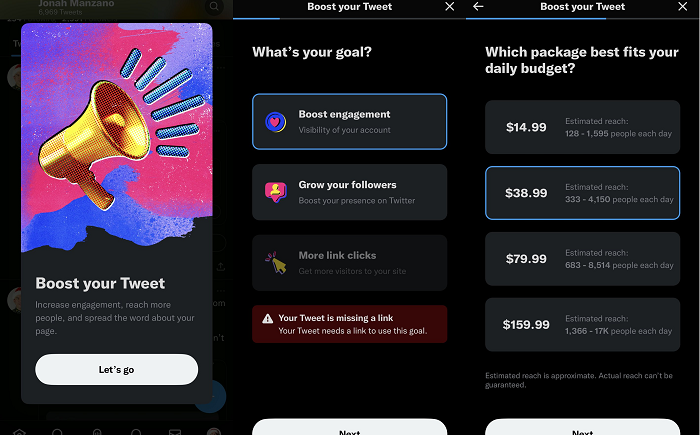
Twitter está probando la nueva opción Quick Boost para Tweets
Aquí está el problema, Twitter ya no tiene un departamento de comunicaciones; ahora no hay un lugar para confirmar información sobre las últimas actualizaciones y funciones de la aplicación, dónde están disponibles, etc.
Caso en cuestión: esta semana Twitter parece haber lanzado uno nueva opción de impulso in-stream para tweetsque proporciona una forma rápida y fácil de promocionar su tweet sin tener que lanzar una campaña de promoción completa. Como se puede ver en estas capturas de pantalla publicadas por Jonás Manzano (y compartido por mateo navarra), la nueva opción de impulso estaría disponible directamente a través de un tweet. Simplemente escriba, elija un presupuesto y amplifique su tweet en ese momento.
Lo que parece nuevo, pero también parece familiar. Es un poco como Twitter. Opción de promoción rápidapero una versión aún más optimizada con nuevos gráficos y una nueva interfaz para impulsar un tweet directamente desde la pantalla de detalles. Por lo tanto, parece ser una nueva incorporación, pero dado que nadie en Twitter puede preguntar al respecto, es difícil confirmar los detalles sobre la opción. Pero por lo que podemos decir, este es un nuevo proceso de anuncios de Twitter que podría ofrecer una forma diferente de establecer una meta, un presupuesto y parámetros básicos de orientación para llegar a un público más amplio en la aplicación. Lo que podría ser bueno según el rendimiento, y es posible que haya algunos tweets que solo desee impulsar rápidamente y llegar a más personas sin lanzar una campaña completa.
También podría ser una buena manera para que Twitter recaude algo de dinero extra por publicidad, y podría valer la pena experimentar con ella para ver qué obtienes según el proceso de inicio simplificado.
Si está disponible para usted. Preguntaríamos a Twitter dónde está disponible, pero no podemos. Puede que lo veas en la aplicación, puede que no. Este es el enigma de Twitter 2.0.
Cómo administrar fácilmente varias cuentas de redes sociales
Cuando esté creando su estrategia de redes sociales, hay algunas preguntas obvias que deberá responder. ¿En qué plataformas tiene más sentido invertir? ¿Cuál debería ser tu cadencia de publicación? ¿Cómo estructurará su equipo de redes sociales? Todas estas son consideraciones importantes para la gestión de redes sociales, pero hay una más en la que pensar. ¿Cuántas cuentas necesitas?
Puede pensar que una cuenta por plataforma es lo ideal, pero dependiendo de las necesidades de su empresa y sus objetivos de redes sociales, podría ser de su interés administrar varias cuentas de redes sociales para diferentes funciones. Lo ayudaremos a descubrir cómo evaluar las necesidades de su cuenta y crear una estrategia adaptada a un enfoque de varias cuentas.
4 señales de que su negocio necesita múltiples cuentas de redes sociales
Puede ser difícil saber cuándo ha superado la necesidad de una cuenta de redes sociales por red. Aquí hay cuatro formas en que puede evaluar si es hora de invertir en varias cuentas de redes sociales.
La atención al cliente domina su feed
Los clientes recurren cada vez más a las redes sociales para obtener atención al cliente. No quieren esperar a que alguien les devuelva el correo electrónico o navegar por un laberinto de avisos telefónicos para comunicarse con un agente. Quieren hacer una publicación rápida y que alguien se comunique con ellos rápidamente. Según el Sprout Social Index™ de 2022, más de la mitad (57 %) de los consumidores esperan una respuesta de las marcas en un plazo de 12 horas.
Cuando su negocio crezca hasta el punto de que la mayoría de sus publicaciones respondan a problemas de soporte o quejas, podría ser el momento de dedicar una cuenta a esos problemas. La cuenta de Twitter de Xbox Support es un excelente ejemplo de una cuenta de soporte. Sus publicaciones están diseñadas para informar a los usuarios sobre los problemas que están trabajando para solucionar y responden a los problemas de los usuarios con soluciones o instrucciones para su canal de soporte de DM. Somos conscientes de que es posible que algunos usuarios no puedan jugar eFootball 2022 en este momento. Nuestro equipo de investigación está investigando este problema y actualizará aquí y en nuestra página de estado para obtener actualizaciones. Gracias por su paciencia. https://t.co/qovy333M6L
— Soporte de Xbox (@XboxSupport) 26 de enero de 2023 Manejas múltiples audiencias
Eche un vistazo a sus perfiles de clientes ideales (ICP), o tal vez ICP. ¿Cuánto tienen en común? Si sus audiencias comienzan a dividirse en distintos segmentos, podría ser el momento de considerar tener múltiples perfiles sociales para atender a cada uno.
Por ejemplo, Texas A&M University tiene audiencias de profesores, estudiantes y ex alumnos. Más allá de eso, la universidad abarca 16 facultades académicas, 19 deportes de la NCAA y cientos de departamentos. Lo que le importa a un estudiante de ciencias de la vida probablemente no coincida mucho con lo que le importa a un ex alumno obsesionado con el fútbol. Con ese nivel de diferencia, tienes que dividir tus cuentas sociales para asegurarte de seguir siendo relevante. Si es una gran corporación, es posible que tenga audiencias que busquen información más allá del marketing, las ventas y la atención al cliente. En Sprout, tenemos un relaciones con inversionistas twitter para mostrar aspectos destacados relevantes para esa audiencia. Las empresas empresariales con un gran volumen de ofertas de trabajo pueden tener una cuenta de carreras dedicada a los solicitantes de empleo. Si los mensajes importantes no son relevantes para una gran parte de su audiencia principal, podría ser el momento para varias cuentas.
Por ejemplo, New Jersey Transit tiene 14 cuentas de Twitter separadas para cada línea de transporte que opera. Si un usuario estaba buscando información sobre el servicio de autobús, pero el feed de NJ Transit estaba repleto de información sobre contrataciones, interrupciones del servicio de trenes y actividad policial, se sentiría bastante frustrado. NJ Transit administra esa complejidad a través de múltiples cuentas.
Lidias con las diferencias regionales
Si su empresa tiene varias ubicaciones o atiende a una variedad de regiones, administrar varias cuentas de redes sociales puede ser lo mejor para usted. Una tormenta de nieve en Nueva York podría cerrar sus establecimientos allí, pero eso no les importa en absoluto a sus clientes en la soleada Florida. Tener múltiples cuentas sociales puede ayudarlo a navegar por las complejidades regionales.
Un gran ejemplo de esta estrategia son las cuentas de Twitter de Aldi. Como empresa multinacional, es probable que haya diferencias en productos y audiencias a través de las fronteras. Aldi divide su presencia social en Aldi US y Aldi UK, con contenido muy diferente en cada uno. En la cuenta del Reino Unido, presentan productos disponibles únicamente en esos lugares y modifican su tono y ortografía para que coincidan con el estándar regional. En la cuenta de EE. UU., utilizan la ortografía y el tono estadounidense, al tiempo que hacen referencia a eventos culturales exclusivamente estadounidenses, como los playoffs de la NFL. Es hora de que comiencen los verdaderos playoffs, deje caer su bocadillo ganador del día del juego.
— ALDI EE. UU. (@AldiUSA) 20 de enero de 2023 Tienes mucha variedad en tu suite de productos.
Si tiene una empresa de nivel empresarial, lo más probable es que tenga muchos productos. Si bien todos esos productos pueden ser relevantes para una empresa en general, es probable que no resuenen con cada usuario individual.
A medida que crece su conjunto de productos, puede ser ventajoso crear cuentas para productos específicos o audiencias de usuarios. Por ejemplo, Salesforce administra cuentas de diferentes productos para que puedan llegar a un público más amplio con contenido relevante. Cómo administrar múltiples cuentas de redes sociales en 5 pasos
Administrar varias cuentas de redes sociales puede parecer desalentador, pero no tiene por qué serlo. Siga estos cinco pasos para comenzar.
Paso 1: Ten una estrategia en marcha
Tener una estrategia de redes sociales sólida es imperativo para cualquier marca, pero es especialmente importante cuando administra la complejidad de varias cuentas. Para comenzar, hay algunas cosas que necesita evaluar.
Primero, establece qué cuentas necesitas crear. Documente sus requisitos. ¿Va a segmentar las cuentas por propósito, como soporte versus marketing? ¿O tiene más sentido segmentar por atributos como audiencia, ubicación o producto? Una vez que tenga esas respuestas, decida cuántas cuentas necesita y cómo debe administrarlas su equipo. También debe pensar en cómo interactuarán sus equipos. Krista Berend Director de Redes Sociales en Texas A&M Una vez que haya decidido qué cuentas crear, fije metas tangibles para cada una. Necesitará KPI para asegurarse de que la complejidad adicional esté generando resultados para su empresa. Mida su desempeño contra esos KPI constantemente y no tenga miedo de adaptarse o modificar cuando tenga un rendimiento bajo.
Si está buscando un lugar para comenzar, esta plantilla de plan de redes sociales de 30 días es un excelente punto de partida.
Paso 2: documente las pautas de su marca
Cuando tiene un administrador de redes sociales y una cuenta por plataforma, es bastante fácil mantenerse dentro de las pautas de la marca. Pero cuando agrega la complejidad de administrar varias cuentas, necesita un gobierno más formal. Asegúrese de tener a mano una guía de marca con instrucciones para su voz, tono e imágenes para cada cuenta.
Cuando se trata de diferentes audiencias, es posible que desee realizar pequeños cambios en las cuentas. Mantener una voz que resuene con su audiencia es la prioridad, lo que significa dejar espacio para un pequeño matiz. Documente esas diferencias en sus pautas también para que nunca haya confusión sobre cómo aplicar la voz general de su marca en contextos específicos.
Paso 3: Reutilizar contenido
Tener múltiples cuentas de redes sociales significa tener que crear más contenido. Eso es solo matemáticas. Es aún más importante tener una sólida estrategia de reutilización de contenido.
La publicación cruzada entre plataformas es una excelente manera de comenzar. Lo que funciona bien como Reel podría funcionar bien como TikTok. Retwittear contenido relevante en varias cuentas atrae más atención a la misma publicación, pero también tiene la ventaja de atraer más atención a sus otras cuentas. Puede convertir contenido de video en GIF para compartir en otras plataformas. El mundo de la reutilización de contenido es infinito si eres creativo.
Otra forma de reutilizar su contenido es desarrollar una biblioteca de activos reutilizables. La biblioteca de activos de Sprout Social le permite organizar y categorizar los activos creativos de uso frecuente, lo que ayuda a todos los miembros de su equipo a asegurarse de que están utilizando medios aprobados. Paso 4: Invierte en una herramienta de gestión de redes sociales
Ya es bastante difícil administrar una cuenta de redes sociales de forma nativa. Es casi imposible administrar múltiples cuentas de redes sociales sin una mano amiga.
Las herramientas de administración de redes sociales mantienen sus mensajes directos, calendario de contenido, respuestas, menciones y métricas bajo un mismo techo. Incluso si tiene varias cuentas, todas estarán alojadas en un solo lugar para que pueda ver todo en una pantalla, en tiempo real. También crea una fuente única de verdad para equipos sociales sofisticados para que pueda permanecer en la misma página y seguir escribiendo la misma historia. Sprout Social es una plataforma de administración de redes sociales todo en uno que ayuda a los equipos a abordar todos los aspectos cotidianos de las redes sociales, desde la publicación y el compromiso hasta la presentación de informes y la planificación para el futuro.
Comience su prueba gratuita de Sprout
Paso 5: Automatice sus tareas
Cuando administra varias cuentas, escalar puede ser difícil. Ahí es donde entra en juego la automatización. Las herramientas de automatización de redes sociales se encargarán de las pequeñas tareas para que puedas concentrarte en la estrategia.
Administrar múltiples cuentas de redes sociales significa múltiples fuentes de DM. La bandeja de entrada inteligente de Sprout Social agrega todos sus mensajes a través de cuentas y plataformas en una sola vista. Puedes responder directamente desde la plataforma para que nunca te pierdas un mensaje. La aplicación de reglas de bandeja de entrada basadas en etiquetas también puede ayudar a enrutar automáticamente la solicitud al respondedor correcto.
Próximamente, los usuarios de Sprout en el plan Avanzado también tendrán acceso a Variables de publicación personalizadas, lo que brinda a los equipos la capacidad de cambiar dinámicamente partes específicas de una publicación social según las variables personalizadas predefinidas. Una publicación se puede adaptar rápidamente a cada una de sus ubicaciones o cuentas específicas de productos, eliminando una cosa más de su lista de tareas pendientes en las redes sociales.
Administre varias cuentas de redes sociales con un estrés mínimo
Crear y administrar varias cuentas de redes sociales no tiene por qué ser estresante. Con el conjunto adecuado de herramientas y un objetivo claro, tener varias cuentas mejorará las relaciones con su audiencia y simplificará sus procesos.
¿Está interesado en probar una herramienta que facilitará la administración de varias cuentas? Prueba Sprout Social durante 30 días. Source link

13 Ways to Increase Your Instagram Engagement Rate
Are your Instagram posts getting enough Likes and comments? When you’re marketing on Instagram, driving authentic organic engagement should be a top priority.
Sure, you may be creating awesome content. But if no one is Liking or commenting on it, there’s a good chance your account will fall through the cracks. Next thing you know, you’re struggling to get customers from Instagram, and your investment simply goes to waste.
In this guide, we show you exactly what to do to give your Instagram engagement rate a much-needed boost. Let’s dive in.
Table of contents What is Instagram engagement?
Instagram engagement refers to a measure of how people are interacting with your content. It considers details such as your follower count along with interactions such as likes, comments, saves and shares. This metric helps you gauge how well your content resonates with your audience.
How to calculate your Instagram engagement rate
To calculate your Instagram engagement rate, you’ll need to look at the total number of content interactions. This includes Likes, comments, shares, Story replies and saves. Then use the formula below to calculate.
Engagement rate = (Total interactions/Impressions) x 100
What is a good engagement rate on Instagram?
According to the latest Instagram stats, posts typically get an average engagement rate of 0.98%. So anything around this number should be safe. That said, you’d ideally want to shoot for a higher engagement rate than the platform average.
13 tips to improve your Instagram engagement rate
Now it’s time for the fun part. The following tips will show you how to get more Instagram engagement.
1. Actually engage with your audience
We’re starting this list off easy. To drive more engagement from your followers, you need to interact with them. Social media isn’t a one-way street. If you want to build an engaged audience, you need to acknowledge your followers. Remember, every comment you get means someone took the time to stop, look at your post and share their thoughts. After all that, why wouldn’t you respond?
If you want to build up engagement, know that it takes time and you need to start conversations on posts other than your own. Asking questions, responding to comments and replying to Stories are some of the few ways to engage more with your audience.
With comment threading, it’s even easier to know which ones you’ve missed on your posts. Not to mention, Sprout Social’s Smart Inbox lets you easily check off comments you’ve already responded to. As your account starts to grow and you get more comments, you might not be able to respond to everyone. But that doesn’t mean you should give up entirely. You can still Like comments or just try to reply to as many as possible.
For instance, Canva has over a million followers on Instagram. The brand deals with hundreds of comments on its posts, so it’s not always viable to reply to every single comment. However, it takes time to respond to comments that ask questions or bring up an important feature. Source
2. Copy your top-performing posts
What works for you might not work for someone else. Take a look at your past months’ best-performing posts. Is there a common theme among your top performers?
For example, you might find that photos with bright and bold colors get a ton of Likes. Or maybe people are engaging more with Reels that have music in the background.
Use our Instagram dashboard to find your top-performing posts. Then look for commonalities between the posts and try to incorporate more of them in the future.
3. Use Instagram Stories to your advantage
Instagram offers plenty of stickers that make it easy to drive engagement through Stories. Every time someone engages with those stickers, it counts toward your engagement.
Use these stickers to conduct polls and quizzes or get your followers to ask you questions. See how Living Stone Construction creates a simple poll asking people to vote if they like the renovation work. You could make it more fun and competitive by asking people to guess the correct answer to a question. The question sticker is perfect for hosting an AMA (Ask Me Anything) session. You’ll then be able to share a series of Stories answering those questions.
One of the latest Instagram trends involves using the “Add Yours” sticker. Use this sticker to start a challenge and get people to engage with your brand. Share a prompt and encourage people to participate in your challenge by adding their own content.
4. Promote across networks
It goes without saying that the audience for your Facebook Page might not be the same as the audience on your Instagram account. Chances are that some of your Facebook audience is on Instagram, but they just don’t know that you exist there yet. Don’t be afraid to sprinkle some cross-network promotional posts to encourage more followers.
5. Be strategic with Instagram ads
When Facebook added Instagram into their Ads Manager, new targeting possibilities opened up. Sure, you can boost a post or promote your account, but it’s important to be more nuanced and strategic about it.
Take advantage of the customization by using retargeting and custom audiences. For instance, if you visit a furniture store website like Pottery Barn, you’ll start to get ads from other furniture stores. After searching around for a bookshelf, we found the following ads from other brands that sell furniture. Custom audiences can come from many sources. But to start, try using: Your newsletter lists
People who have visited your store
Those who purchased from your website
People who’ve engaged with your Facebook or Instagram accounts From there, you’ll then be able to find even more people similar to any of the above audiences using the lookalike audience feature.
Getting familiar with all the Instagram advertising options will put you ahead of your competitors. And retargeting will further help you improve conversions and lower your ad costs.
6. Create more short-form video content
Guess what we found in the 2022 Sprout Social Index? Short-form video is the most engaging type of in-feed social content. That means your Instagram content strategy needs to change direction. And the focus should shift to creating more short-form videos. In other words, Reels are your best friend for boosting your Instagram engagement. Who knows? It might even be just the thing you need to go viral on Instagram.
Create Reels showing how-to tips and tricks or behind-the-scenes processes, for instance. Reels can be informational as well, providing a quick list of things people might want to know. See how Drunk Elephant creates a Reel listing some reasons why a certain product is great. Source
7. Make the most of the Collab feature
Instagram recently introduced a feature enabling users to create Collab posts with other users. A Collab post shows up in the Feeds of both of your followers, meaning a chance to garner higher engagement. So make the most of this feature to collaborate with influencers, industry leaders and brand partners. Source
The Honest Kitchen regularly creates Collab posts with pet influencers to promote its human-grade pet food. This allows the brand to get its products in front of a massive and relevant audience i.e., the pet influencer’s followers. As expected, these posts have managed to garner hundreds of thousands of Likes and comments.
8. Give sneak peeks and hints
Followers love it when you let them in on a secret. Even if they’re public posts, giving sneak peeks and hints of new releases makes the audience think they’re part of a special group. It entices them to guess what’s going on and encourages them to revisit the profile to see if there’s been an announcement.
Check out how Fourth Ray Beauty shares a teaser for an upcoming product without giving too much away. The Reel gives a short close-up shot of the new product. And the caption only gives a hint by including a cherry emoji. Source
9. Write captions that drive engagement
Your Instagram captions give you the perfect opportunity to include a call for action. In this case, the action would involve some type of engagement. For example, asking a question in your caption would encourage your followers to share their answers in the comments. Or you could share a prompt that would make them want to share their experience or thoughts by commenting.
For example, Pottery Barn shares a carousel post showcasing different stool and pendant pairings for a kitchen island. It then asks followers to vote for their favorite in the comments. Needless to say, the post managed to rack up plenty of comments from enthusiastic followers who wanted to vote. Source
10. Post your content at the best times
Use our Instagram analytics to find out when the best time to post is for you. You want to post when most of your followers are online and engaging on the app. Even with the best photo and wittiest caption, you could still miss out on engagement if you’re posting at the wrong hour.
We did some research into the best times to post on Instagram, and here’s what we found for Instagram. But keep in mind that the specific timing may be different for your account. Instagram business accounts offer analytics that tells you when your followers are most active. Use this information to schedule your posts and free up your time to engage with comments. Alternatively, use Sprout’s ViralPost feature to automatically schedule your posts at the optimal time. This feature ensures that your Instagram posts go out at a time when you receive the most engagement.
11. Encourage customer and employee posts
Use branded hashtags to help you organize user-generated content. If you engage in these hashtags and incorporate a UGC strategy, more people will take notice and begin using the hashtags, too.
Your employees can be your strongest advocates as well. Their accounts give a more personal, unfiltered perspective of the company. Remember, people like feeling as if they’re in a secret club. If you reshare from your employees, you’re offering perspectives that your brand normally wouldn’t offer.
12. Host a fun giveaway contest
Who wouldn’t want to win free stuff? That’s exactly why social media giveaways are so great for boosting your Instagram engagement. They get people to engage with your brand in a way you’ve never seen before.
Whether the contest involves commenting, sharing or contributing a story–you get to drive engagement either way.
That said, your giveaway contest must be strategic and intentional. Make sure to design the rules keeping your goal in mind i.e., boosting engagement. Moreover, the prize should be attractive; it should be valuable enough to get people to participate.
For example, Fenty Beauty hosted a Game Day Giveaway for a chance to win two tickets to the Championship Game. The brand would cover the cost of flights, hotels and ground transportation. As you can expect, this post saw more than 17k Likes and almost 18k comments. Source
13. Improve your Instagram hashtags
It’s a well-known fact that using the right hashtags helps you grow your reach. But with that increased reach comes a greater chance of boosting engagement. The more people see your content, the higher the chance that they’ll engage with it.
Use relevant and niche hashtags that will let you tap into the right audience. The goal is to get Instagram to show your content to users who have shown an interest in topics related to that hashtag. So when these users see your content, they’re likely to check it out and engage.
Why a good engagement rate matters on Instagram
So what’s the big deal about Instagram engagement? Check out these key benefits of having a good engagement rate on Instagram.
Improve platform visibility
The Instagram algorithm uses several factors to rank and display content. While relevance is one crucial element, engagement is another major consideration. Even among relevant content, posts that see tons of engagement are more likely to show up in a user’s Explore. So having a good engagement rate is essential to improve your visibility on Instagram.
Attract a new audience
With higher visibility comes an increased chance of attracting a new audience. Instagram will typically show your content to people who are most likely to be interested in it. If these users like your content enough, they may want to check out your profile and even follow you. In other words, a good engagement rate may help you grow your Instagram following.
Boost credibility
To the average Instagram user, a post that has tons of engagement means other people are enjoying it. As such, good engagement serves as social proof and reflects positively on your brand authenticity. People may feel more comfortable trusting your brand because so many others are engaging with it.
Start growing your Instagram engagement
These tips will give you a much-needed engagement boost on Instagram. But a one-off spike in engagement numbers isn’t enough. Make sure you’re following these tips consistently to maintain high levels of engagement.
Sprout’s Instagram integration will help you get started by managing all your comments in one place in a Smart Inbox, freeing up time for you to focus on improving your Instagram engagement. Source link

Matanuska Diesel presenta un sitio web optimizado impulsado por Redoubt Business Solutions
Matanuska Diesel presenta un sitio web optimizado impulsado por Redoubt Business SolutionsWasilla, Alaska – Matanuska Diesel, un mecánico diésel de Wasilla dirigido por veteranos, se enorgullece de anunciar el lanzamiento de su sitio web rediseñado. El sitio, creado en asociación con la agencia local de marketing digital Redoubt Business Solutions, brinda a los clientes una plataforma conveniente y fácil de usar para reservar citas, ver servicios y obtener más información sobre la empresa.Mack Spurlock, propietario de Matanuska Diesel»No podríamos estar más emocionados de habernos asociado con Redoubt Business Solutions en este proyecto», dijo Mack Spurlock, propietario de Matanuska Diesel. «Su equipo ha sido invaluable para ayudarnos a crear un sitio web que no solo brinda a los clientes un fácil acceso a nuestros servicios e información, sino que también refleja la experiencia única que ofrecemos».Sobre la colaboraciónCuando Matanuska Diesel se acercó a Redoubt Business Solutions, su objetivo era claro: un sitio web que fuera fácil de navegar, permitiera programar citas rápidamente y brindara a los clientes información detallada sobre la empresa. Redoubt Business Solutions pudo satisfacer todas estas necesidades y más.El sitio tiene un diseño moderno con elementos de menú de fácil acceso, enlaces de redes sociales e información de contacto para garantizar que los clientes siempre obtengan el apoyo que necesitan. Además, la función de navegación del sitio permite a los clientes ver rápidamente los servicios, obtener más información sobre la empresa y obtener ayuda cuando más la necesitan.»La asociación con Matanuska Diesel ha sido una gran experiencia», dijo Jessica Ridge, propietaria de Redoubt Business Solutions. “Nuestro equipo se esforzó por crear un sitio web que fuera fácil de usar y reflejara la marca Matanuska Diesel y la experiencia del cliente. Estamos encantados con el resultado final.”retos y solucionesUno de los mayores desafíos durante el proyecto fue integrar todas las funciones requeridas en un diseño que encajara con el estilo y la marca de Matanuska Diesel. Para superar esto, Redoubt Business Solutions trabajó en estrecha colaboración con el equipo de Matanuska Diesel para garantizar que su sitio web representara con precisión los servicios y la marca de la empresa. Redoubt Business Solutions creó un sitio web visualmente atractivo que presenta de manera efectiva todas las funciones necesarias a través de una combinación de elementos de diseño de material existente y una paleta de colores moderna.El resultadoEl producto final es un sitio web que representa con precisión la marca Matanuska Diesel y ofrece a los clientes una experiencia de reserva de citas perfecta. El sitio ya ha recibido comentarios positivos de clientes que están satisfechos con la facilidad de reservar servicios a través de la plataforma.»Estamos muy orgullosos de nuestro nuevo sitio web», dijo Spurlock. “Redoubt Business Solutions hizo un trabajo fantástico al crear un diseño limpio y moderno que representa con precisión nuestra marca y nuestros servicios. No podríamos estar más contentos con los resultados.”Acerca de las soluciones comerciales de RedoubtRedoubt Business Solutions, una agencia de marketing digital con sede en Wasilla, se especializa en ayudar a las empresas locales a aumentar su base de clientes y promocionar sus productos y servicios a través de varios canales de marketing, incluidos SEO, marketing en redes sociales, publicidad de pago por clic, marketing por correo electrónico y más contenido de marketing.Jessica Ridge – Soluciones comerciales de reducto»Nuestra misión es apoyar a nuestra comunidad local y ayudar a las empresas a alcanzar su máximo potencial», dijo Jessica Ridge, directora ejecutiva de Redoubt Business Solutions. «Trabajar con Matanuska Diesel en su nuevo sitio web fue una gran oportunidad para cumplir esa misión y estamos seguros de que el sitio web los ayudará a aumentar su base de clientes».Acerca de Matanuska DieselMatanuska Diesel ofrece servicios de resolución de problemas y reparación de clase mundial para todas las marcas y modelos de vehículos diésel utilizando los últimos equipos y tecnología. Sus mecánicos experimentados priorizan la satisfacción del cliente para garantizar una experiencia positiva para el cliente.»En Matanuska Diesel, la satisfacción del cliente es nuestra principal prioridad», dijo Spurlock. «Nuestro nuevo sitio web facilita a los clientes reservar citas y obtener más información sobre los servicios que ofrecemos a los conductores en el área de Wasilla».Al asociarse con Redoubt Business Solutions, Matanuska Diesel obtuvo una presencia en línea que refleja con precisión su marca y sus servicios. Su nuevo sitio web es invaluable para el crecimiento y el éxito del negocio. Con un diseño moderno, menús fáciles de navegar e información útil sobre sus servicios, los clientes ahora pueden encontrar convenientemente toda la información que necesitan en un solo lugar. Los clientes pueden reservar citas fácilmente y ponerse en contacto con Matanuska Diesel con cualquier pregunta o inquietud. Con un sitio web listo para atender las necesidades de sus clientes, Matanuska Diesel está bien posicionada para prosperar en la comunidad de WasillaPara obtener más información sobre Matanuska Diesel, visite el sitio web de la empresa o llame al (907) 376-0800. Visite el sitio web para obtener más información sobre Redoubt Business Solutions y sus servicios de marketing digital.Para más artículos haga clic aquí.(function(d, s, id) { var js, fjs = d.getElementsByTagName(s)[0]; if (d.getElementById(id)) return; js = d.createElement(s); js.id = id; js.src = «//connect.facebook.net/en_US/sdk.js#xfbml=1&version=v2.5»; fjs.parentNode.insertBefore(js, fjs); }(document, ‘script’, ‘facebook-jssdk’));

Cómo hacer que su marca se centre en el cliente (+ ejemplos)
En secreto, todos los clientes quieren que su experiencia con una marca sea como el set de Cheers, donde todos conocen su nombre. Pero, ¿cómo construye una relación, especialmente cuando administra múltiples canales?
En Cheers, o en cualquier lugar favorito del vecindario, hay tantos empleados y tantos clientes habituales a los que hacer un seguimiento. Cuando su negocio se pone en línea, está tratando con miles de clientes potenciales en un momento dado. Dominar una sensación 1:1, incluso cuando está operando 1:muchos, es crucial para la lealtad del cliente.
Según el Sprout Social Index™ de 2022, el 30 % de los consumidores cambiará a un competidor si una marca tarda demasiado en responder preguntas o comentarios. En tiempos económicos como estos, no vale la pena arriesgarse. La clave para permanecer en los corazones y billeteras de sus clientes es centrarse en el cliente.
¿Qué significa estar centrado en el cliente?
Un enfoque centrado en el cliente significa poner al cliente al frente de cada decisión que tome como empresa. La experiencia del cliente debe ser el punto de partida de cualquier nueva iniciativa, mejora o cambio que realices. En la práctica, esto significa recopilar activamente información sobre su cliente a través de encuestas o escucha social, analizar esos datos y brindar de manera proactiva a su cliente lo que quiere, o lo que aún no sabe que quiere. En todos los equipos, todos trabajan para mantener contentos a sus clientes.
Este enfoque vale la pena. Más de dos tercios (77 %) de los clientes tienen más probabilidades de aumentar sus gastos con las marcas con las que se sienten conectados, frente al 57 % en 2018, según la investigación de Sprout. Según el informe CX Trends 2023 de Zendesk, los líderes se están dando cuenta, ya que el 81 % ve la experiencia del cliente y el soporte como una prioridad creciente para 2023. Otro 71 % busca renovar el viaje de sus clientes este año. Como dijo el presidente de Sprout Social, Ryan Barretto, «el éxito del cliente son las nuevas ventas». Desarrollar relaciones con sus clientes es un avance no negociable.
Ejemplos de marcas centradas en el cliente en las redes sociales
Las redes sociales son un complemento perfecto para su estrategia centrada en el cliente. Ya sea que se esté conectando con sus clientes para evaluar cuándo algo sale mal o comunicándose con ellos sobre un nuevo producto o tendencia, las redes sociales son el escenario perfecto para construir relaciones. Aquí hay cuatro marcas que integran las redes sociales en su estrategia centrada en el cliente, y conclusiones sobre cómo puede hacerlo usted mismo.
Escuchando y aprendiendo con Cava
Cava, un restaurante mediterráneo informal y rápido, sirve pitas y tazones personalizados. Cuando tomaron la decisión de descontinuar sus batatas, los clientes rápidamente expresaron su descontento en las redes sociales. Cava escuchó a sus clientes y recuperó el ingrediente popular, anunciando la noticia con un video de TikTok con capturas de pantalla de los clientes rogando por la devolución del tubérculo. En este ejemplo, Cava reconoció su error y cambió en consecuencia, un pilar clave de cualquier enfoque centrado en el cliente. Pero lo llevaron un paso más allá. En lugar de relanzar las batatas como una campaña de origen interno, dieron crédito donde se debía y mostraron a sus clientes que habían estado escuchando sus súplicas en las redes sociales.
Obviamente, el Cava no relanzó un ingrediente en base a unos pocos comentarios. Aquí es donde entran en juego los datos sociales. Las herramientas de escucha social como Sprout pueden ayudarlo a agregar la voz de su cliente para que pueda tomar decisiones que complazcan a la multitud y brindar el mejor producto posible a sus clientes.
Participar en la empatía con ban.do
Las relaciones, independientemente de su forma, se basan en la empatía. Esto también se aplica a las marcas. Dos tercios de los consumidores que sienten que una empresa se preocupa por su estado emocional tienen más probabilidades de ser clientes habituales. Pero, ¿cómo demuestras que te preocupas por el estado emocional de miles de personas a la vez?
Una marca de estilo de vida, ban.do, logró capturar el frenesí que sentían sus clientes el Black Friday con un solo Tweet. Al centrarse en un día particular del año y comprender a su cliente, pudieron empatizar con los 24,000 seguidores a la vez. Como marca de estilo de vida, es probable que los clientes de ban.do sean compradores frecuentes, ya sea con ellos o en general. Con esa información, no es difícil para una marca descifrar lo que sus clientes pueden estar sintiendo durante la temporada de mayor actividad minorista. Si sus clientes son profesionales de ventas, el final de un trimestre puede ser un momento especialmente importante para ellos. Si sus clientes son panaderos ávidos, pueden sentirse emocionados cuando se acercan las vacaciones. Conozca a sus clientes y su estacionalidad para que pueda comprender cómo se sienten.
Aprovechando la oportunidad con Quest Nutrition
Tus clientes están hablando de ti en las redes sociales. ¿Sabes lo que están diciendo? Al prestar atención a las menciones de su marca en las redes sociales, puede crear momentos orgánicos que no son posibles dentro de su propio feed.
Una empresa que entiende esto es Quest Nutrition, una marca de barras energéticas. Un fanático de Quest había sido despedido recientemente y en su publicación de anuncio admitió que había estado acumulando en secreto las barras de Quest de cortesía de su oficina. La marca vio una oportunidad y comentó que le enviarían algunas barras más como una muestra de condolencia y un impulso en su búsqueda de trabajo. Fue un excelente ejemplo de “sorpresa y deleite”. Quest obtuvo más de 5000 compromisos con ese comentario. Plantea la pregunta de cuánto compromiso estás dejando sobre la mesa simplemente enfocándote en tus propias publicaciones. En lugar de monitorear las menciones únicamente en busca de problemas potenciales que deben abordarse, busque oportunidades para interactuar de manera proactiva con sus fanáticos.
Practicando la eficiencia con Salesforce
A estas alturas, las empresas tienen una forma establecida de clasificar los problemas de los clientes en las redes sociales. Lleve al cliente a los DM y resuelva desde allí. Existen importantes beneficios en este enfoque, desde el enrutamiento interno hasta la trazabilidad. Pero a veces, la respuesta está justo frente a nosotros.
Un cliente contactó a Salesforce con un problema. Si bien la respuesta del libro de texto sería trasladar la conversación a los DM, dirigieron a su cliente a los artículos de la mesa de ayuda adaptados a su problema en una respuesta. Este movimiento no solo ayudó al cliente en menos pasos, sino que mantuvo la conversación transparente para que otros clientes que pudieran estar enfrentando el mismo problema pudieran solucionarlo por su cuenta. Cuando se trabaja para centrarnos en el cliente, es importante recordar la carga que recae sobre el cliente. Si algo se puede arreglar con menos clics, probablemente sea el camino correcto.
Cómo convertirse en una empresa centrada en el cliente en las redes sociales
¿Se siente inspirado para fortalecer su cultura centrada en el cliente después de ver esos ejemplos? Nosotros también. Aquí hay algunas formas en que puede priorizar la atención al cliente en su estrategia social.
Sea competitivo
Centrarse en el cliente significa ser la mejor opción para su cliente. Pero no puede medir su éxito a menos que sepa lo que está haciendo su competencia. La inteligencia competitiva es crucial para una estrategia centrada en el cliente. Manténgase al tanto de sus competidores a través de la escucha y el monitoreo social dirigido, haga un seguimiento de sus victorias frente a los competidores en su CRM y trabaje con su equipo de ventas para escuchar lo que dicen los prospectos sobre ellos. Estarás posicionado para ganar en poco tiempo.
Los usuarios de Sprout pueden aprovechar los Informes de la competencia para Facebook, Instagram y Twitter, junto con una plantilla de escucha de Análisis de la competencia, para obtener estos conocimientos de manera regular.
Nunca te pierdas un mensaje
Más de las tres cuartas partes de los clientes esperan que una empresa responda dentro de las 24 horas en las redes sociales. Sin la tecnología adecuada detrás de usted, eso requerirá un tipeo bastante rápido. Afortunadamente, hay herramientas disponibles para ayudarlo a administrar su bandeja de entrada sin perder un mensaje.
La herramienta Bandeja de entrada inteligente de Sprout Social agrega todos los mensajes de todos sus perfiles en un solo lugar. A partir de ahí, puede clasificar fácilmente las solicitudes al equipo correspondiente, ya sea de ventas, atención al cliente o marketing. Incluso puede crear respuestas enlatadas para preguntas o inquietudes frecuentes. Serás un maestro de las comunicaciones con los clientes. Póngase cómodo con la atención al cliente
Cualquiera que haya soportado una interacción de soporte sabe todo sobre los silos en la experiencia del cliente. Ya sea que los clientes tengan que repetir su problema a varios miembros del equipo antes de encontrar una solución o que obtengan respuestas inconsistentes de los sistemas inconsistentes de las empresas, se van descontentos.
Los líderes empresariales están comenzando a reconocer esta oportunidad de mejora y están haciendo grandes planes para solucionarlo. Más de dos tercios (72 %) cree que fusionar los equipos que se ocupan de la experiencia del cliente aumentará la eficiencia y el 62 % planea actuar en consecuencia.
Pero no se detenga en repensar la estructura de su equipo. Reconsidere también su pila tecnológica. Encontrar sistemas de administración de redes sociales que se integren con sus plataformas de atención al cliente puede contribuir en gran medida a eliminar las preocupaciones tanto de su equipo como de su cliente. Sprout Social se integra con Salesforce Service Cloud, por lo que puede tener una vista única de su cliente sin importar dónde lo contacten. Escucha antes de hablar
Los beneficios de los datos sociales son invaluables para su negocio, ya sea que esté trabajando en I+D o en relaciones con inversionistas. El primer paso de centrarse en el cliente es comprender a su cliente. La herramienta de Sprout le brinda acceso instantáneo a una agregación de las opiniones y necesidades de sus clientes. ¿Se pregunta si sus nuevos tamaños de porción están funcionando? Los datos de escucha le dirán más rápido que cualquier encuesta. ¿Quiere medir la recepción del cliente a un nuevo producto antes del lanzamiento? Publíquelo en las redes sociales y deje que los datos lleguen.
La mejor parte de escuchar datos es la capacidad de tomar decisiones ágiles. En lugar de esperar los resultados de la encuesta y el grupo de enfoque para decidir cómo pivotar, puede acceder al sentimiento en tiempo real y hacer la llamada allí mismo.
Convertirse en una empresa centrada en el cliente
Una estrategia centrada en el cliente es una excelente manera de fomentar la lealtad. Al escuchar las necesidades de sus clientes, comprender y empatizar con sus puntos débiles, resolver sus problemas de manera eficiente e ir más allá donde sea necesario, su marca puede convertirse en la favorita de sus fanáticos para siempre.
¿Se pregunta cómo se compara su marca cuando se trata de centrarse en el cliente? Utilice nuestra auditoría de experiencia del cliente y descubra cómo la experiencia de su cliente se compara con los puntos de referencia de la industria y las expectativas del consumidor. Source link